Free Forex Calculators: Every Tool You Need in One Place

Stop guessing. Start calculating.

Whether you are just getting started in forex or already trading live accounts, one of the biggest mistakes traders make is entering positions without doing the math first. That is exactly why we built a free suite of professional-grade forex calculators, available directly on this site, with no registration required.

What is included

Position Size Calculator
The foundation of every trade. Enter your account balance, risk percentage and stop loss distance, and get the exact lot size you should trade. Protect your account before you click buy or sell.

Risk/Reward Calculator
Know your ratio before you enter. See your potential profit and loss in dollars, and make sure every trade you take is worth the risk.

Pip Calculator
Calculate the exact pip value for any instrument and lot size, including forex majors, minors, exotics, indices, metals, energy and crypto. Supports all IC Markets instruments.

Margin Calculator
Find out exactly how much margin a position requires before you open it. Works across all leverage settings.

Breakeven Calculator
Account for spread and commission. Know the exact number of pips or points the market must move before your trade becomes profitable.

Profit and Loss Calculator
Simulate the outcome of any trade. Enter your entry, exit and lot size to see your P&L before and after you place it.

Swap Calculator
Plan for overnight costs. Calculate the swap fees for long and short positions across any holding period.

Forex Growth Calculator
Set a starting balance, lot size and growth rate, choose your period (hourly, daily, weekly, monthly or annual), and watch your account compound over time. Add a target balance and a start date to see exactly when you could reach your goal.

Why these calculators are different

Every calculator on this site covers the full instrument list available on IC Markets, including futures symbols with expiry codes, cross-currency metals, indices quoted in non-USD currencies, and all major crypto pairs. Pip values are calculated correctly for each instrument type, not just standard forex pairs.

All tools are free, work instantly in your browser and are built for traders who take risk management seriously.

→ Open the Forex Calculators Hub

TeamViewer Popup Killer v2.3

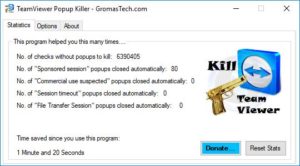
TeamViewer Popup Killer main window

If you are here, you are one of thousands of people that hate popups…

By now you probable already know TeamViewer Popup Killer software, and chances are that you got it from the previous website, GromichoAFSystems.com.

Gromicho AF Systems is now GromasTech, and all the software will be updated for new branding and also some new improvements.

Today was the time of TeamViewer Popup Killer to get updated!

TeamViewer Popup Killer main window

There are not much features added as most work was done internally to fix some bugs and to give a better user experience using the program.

Although there is two new features that I bet you will like! At least one of them maybe…

TeamViewer Popup Killer options window

As requested by the user “Klepp0906”, an option to hide the icon on the Windows system tray was added. This is working but I still consider it as a testing/experimental feature.

Another feature added was the “dark mode” theme. This far from perfect, and its there as a market research, so please let me know in the comments what do you think about this, and  if you actually want a dark mode.

TeamViewer Popup Killer main window dark

Also, don’t forget to let me know in the comments bellow what do you think about TeamViewer Popup Killer in general. If you want a new feature, just click here to request it!

Download TeamViewer Popup Killer

TeamViewer Popup Killer v2.3

TeamViewer Popup Killer main window

There are not many features added as most work was done internally to fix some bugs and to give a better user experience using the program.

Although there is two new features that I bet you will like! At least one of them maybe…

As requested by the user “Klepp0906”, an option to hide the icon on the Windows system tray was added. This is working but I still consider it as a testing/experimental feature.

Another feature added was the “dark mode” theme. This far from perfect, and its there as a market research, so please let me know in the comments what do you think about this, and  if you actually want a dark mode.