One evening in November our trading PC restarted twice in four minutes. Nobody had asked it to. Windows Update had decided it was time, and the restart took everything with it: the monitoring scripts and the MetaTrader terminals with their expert advisors. The PC was switched on, someone was signed in, and the Windows policy that is supposed to prevent automatic restarts while a user is logged in was already set. It restarted anyway.
DontSleep GT exists because of that evening. It is a small, free Windows tray program for people who leave something running while they are away from the computer: a trading terminal, a render, a backup, a long download. It does two jobs, and it is honest about where its power ends.
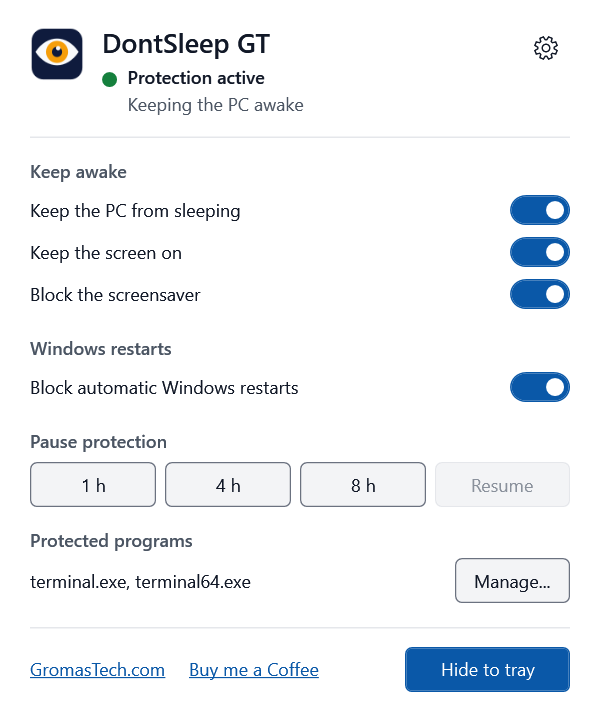
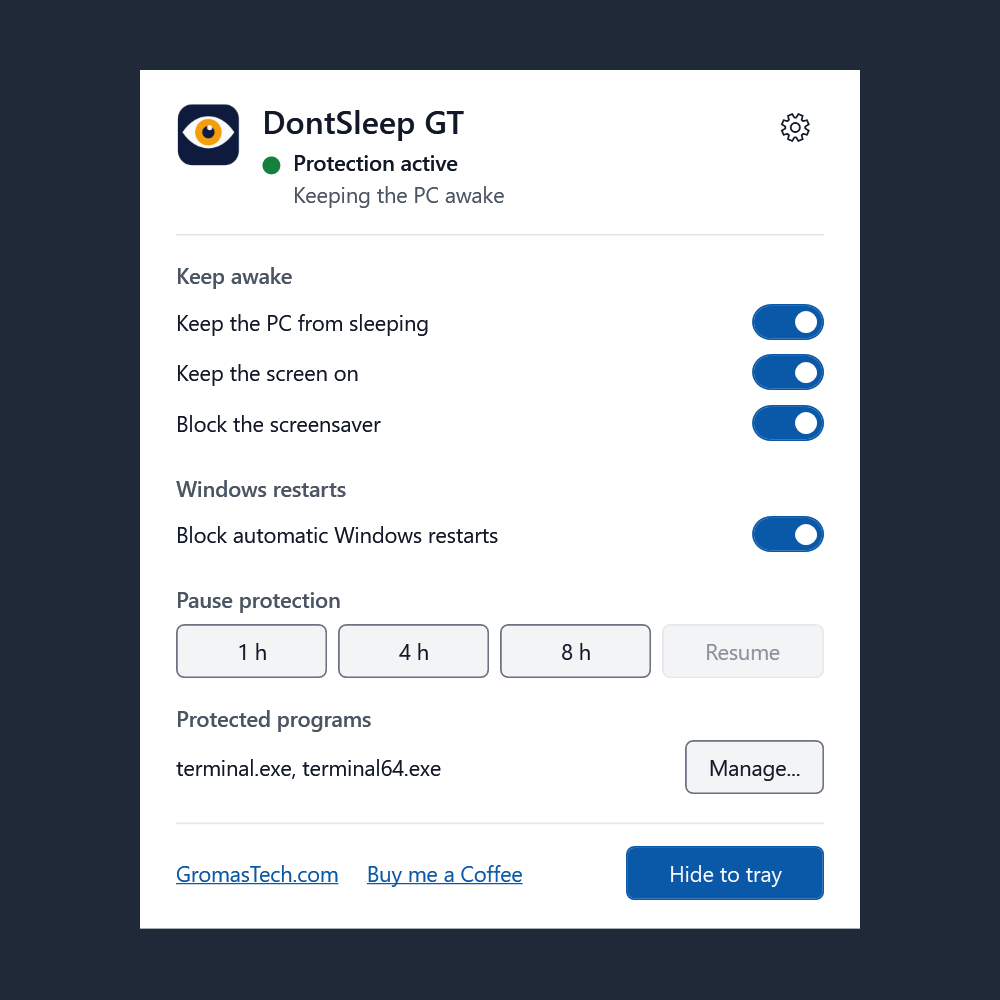
The main window: current state, the switches, the pause control and the protected programs.
How it works
The first job is to guard against restarts you did not ask for. Windows writes an entry to its event log every time something starts a restart or a shutdown, and the entry says which program asked. DontSleep GT watches for those entries and sorts them into two groups: restarts you started yourself, and restarts that Windows started on its own, mostly Windows Update.
When Windows starts one on its own, DontSleep GT runs the same command Windows gives everyone to abort a pending shutdown, and shows a small card next to the tray that says what happened. From the card you can close it, or postpone the reminder with clock times, such as in 1 hour at 15:40 or tomorrow at 09:00. Some restarts cannot be cancelled by any program. In that case the card tells you so and asks you to save your work, instead of pretending everything is fine.
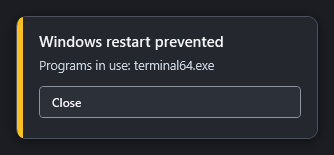
A Windows restart was started automatically and cancelled. The card says what happened and offers to postpone the reminder.
If you start a restart yourself while a program you marked as protected is still running, DontSleep GT does not cancel anything. It adds a line to the Windows closing screen with its own name and the name of the program that is still open. You can still choose to restart anyway. It is a speed bump, not a lock. An optional setting extends the same speed bump to every manual restart and shutdown, and it is off by default so you can always shut the PC down normally.
The second job is to keep the PC awake. It uses the normal Windows power request, the same one video players use, so the PC does not go to sleep, the display stays on and the screen saver stays off. Each of the three can be switched off on its own. The guard keeps working while the session is locked, which is exactly when nobody is looking at the screen. You can pause the protection for 1, 4 or 8 hours, and it resumes by itself.
The program lives in the tray. Double click the icon for a small window with the state, the switches and the protected programs. Closing the window only hides it. It has to keep running to protect you, and Exit is the only way to stop it.
Who it is for
Trading PCs are the reason it exists. MetaTrader’s terminal.exe and terminal64.exe are protected by default, so a restart is guarded the moment a terminal is open. The same idea fits anything that must not be interrupted: long renders and video encodes, backups and large file transfers, overnight downloads, and machines that run without anyone sitting at them, such as a monitoring box or a PC you reach through remote desktop and cannot easily get back after an unexpected restart.
For administrators
DontSleep GT installs with a standard setup program, so it works in scripts, deployment tools and unattended Windows installs. Run it from an elevated prompt or as SYSTEM. These are the switches:
/VERYSILENT: no window at all./SILENTshows only a progress window./SUPPRESSMSGBOXES: never shows a message box. Use it together with/VERYSILENT./NORESTART: never restarts Windows. The installer does not need a restart./LANG=enor/LANG=pt: language of the installer. Without it, Windows decides./TASKS=desktopicon: also creates a Desktop shortcut. No extra tasks by default./NOSTART: does not start the program when the installation ends./LOG="C:\path\setup.log": writes a log of the installation.
A typical unattended install looks like this:
DontSleepGT-Setup-1.0.0.exe /VERYSILENT /SUPPRESSMSGBOXES /NORESTART /LANG=en /LOG="%TEMP%\dontsleep-setup.log"
The program always installs to C:\Program Files\Gromas Tech\DontSleep GT, and the folder cannot be changed. That is deliberate: the optional Start with Windows feature uses a task that runs with administrator rights, so the program only registers it from a folder that ordinary users cannot write to. A silent install starts the program in the tray when it finishes, unless you pass /NOSTART or Setup runs as SYSTEM, where there is no user session to start it in. It then starts at the next sign in. The program’s settings belong to each user, so a deployment tool cannot preset them for the person who will sign in.
To remove it silently:
"C:\Program Files\Gromas Tech\DontSleep GT\unins000.exe" /VERYSILENT /SUPPRESSMSGBOXES /NORESTART
Uninstalling puts the Windows restart settings back, removes the start-up task and closes a running copy. A silent uninstall keeps the program’s own settings for a later reinstall. Add /REMOVESETTINGS to delete them too, for the account that runs the uninstaller. The program also has two switches of its own: --tray starts it in the tray only, and --restore-and-exit puts the Windows settings back and exits.
Privacy
DontSleep GT does not use the network. It has no updater, no analytics and no telemetry, and it never sends or receives data. The only web addresses it can open are on GromasTech.com, and only when you click one of two links in its window, the website link and Buy me a Coffee. Those open in your normal browser, so the program itself makes no connection. The settings are stored in your own Windows registry, and the only log it writes is a local error log.
Honest limits
Windows has the last word. DontSleep GT asks, warns and cancels, but it cannot beat everything. Some restarts cannot be cancelled. A power cut, a crash or a hard reset stops the PC regardless. A policy set by an administrator, or a restart forced by a deadline, can override the program. Windows may also change how its update restarts work in a later version. It is no replacement for a UPS or for setting up your trading platform to recover cleanly.
Other things to know before you install it. It needs administrator rights, because that is what guarding restarts requires. The installer is not code signed, so Windows SmartScreen may show a warning the first time: choose More info, then Run anyway. It is built for 64 bit Windows 10 and 11, and it was tested on Windows 10 22H2. It has not been tested on Windows 11 yet.
DontSleep GT 1.0 is free. If it saves you a night of work, there is a Buy me a Coffee link in the window and on the website. The download page has the installer and its SHA256 hash, so you can check the file before you run it.